01 / Data
Capture It Once. Keep It Connected.
Applications, documents and related records give each review a shared foundation.
The Platform / Built Around Your Process
At its core, EDvera is application and data management software. Connect configured workflows, feedback loops, pre-populated fields and records—then put that information to work through reporting and informed decisions.
Configured workflows. Connected records. Hands-on support.
01 / Data
Applications, documents and related records give each review a shared foundation.
02 / Insight
Dashboard status and reports help your team see progress and identify where attention is needed.
03 / Impact
Support informed oversight and useful public information. Regulatory judgment stays with your organization.
Configured Applications & Workflows
EDvera connects submission, review, revision and decision. Applications use conditional logic and data validation, with workflow stages configured around how your organization works.
Automated notifications flag workflow transitions and required actions. Date-driven reminders support deadlines and renewals, so the next step doesn’t depend only on someone remembering to send an email.
Plan Your Workflow with Our Team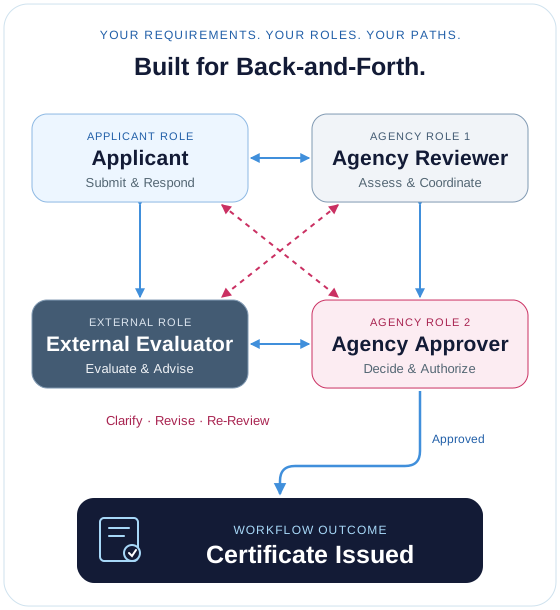
Connected Records / Shared Context
Bring institutional information, related programs, locations and documents together. Reviewer comments and document change history preserve the context behind an application—not just its latest status.
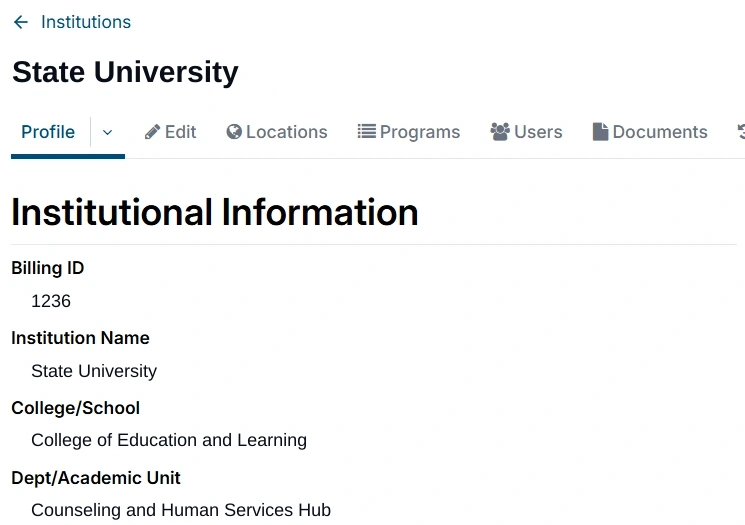
A shared profile provides institutional context and access to related records, helping your team follow the work across application cycles.
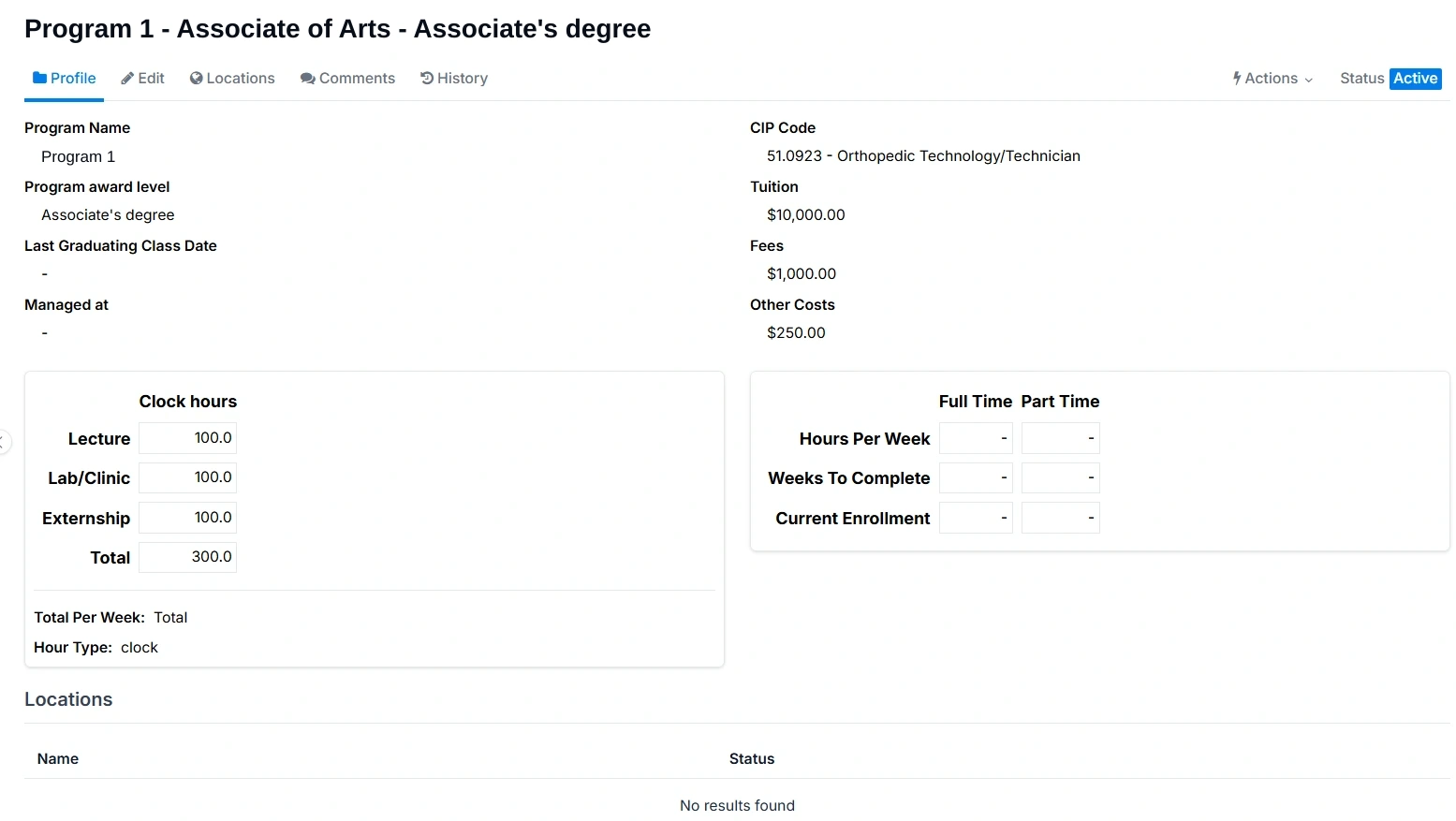
This higher-education example brings award levels, CIP codes, tuition, fees and instructional hours into the program record alongside the broader oversight process.
Dashboard Status & Reporting
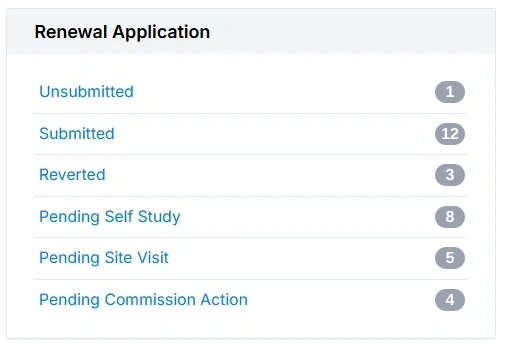
Dashboard status counts show where work sits in your configured process. The renewal example above makes submission, self-study, site visits and commission action visible in one view.
Use reports to look beyond a single application. EDvera helps make the information accessible; your team interprets the findings and decides what to do next.
Talk About Your Reporting NeedsStart with Your Requirements
Define the reports your organization needs during implementation.
Explore a Specific Question
Use filters and indices to extract specific information, then save the report for future use.
Take the Information Further
Download report results for further analysis by your team.
Modern Automation & Intuitive Tools
Combine workflow automation with practical everyday tools. Keep participants informed, reuse information and simplify routine tasks without replacing the people responsible for review and decisions.
Communications & Visibility
Configure notifications around workflow transitions and required actions. Use reminders to support deadlines and renewals, and status updates to keep participants informed as work progresses.
Connected Information
Map information between configured forms and records to reduce repeat entry. Keep records current with straightforward updates, and put existing information to use across your process.
From Decision to Documentation
Generate documentation from the relevant record and decision, using configured templates. Support consistent communication of outcomes without recreating each document from scratch.
Everyday Efficiency
Use bulk actions for supported tasks across multiple records. Share broader updates through the announcement feature, alongside the notifications tied to individual workflows.
Available actions, mapped fields, templates and notifications depend on your configuration and user permissions. Regulatory decisions remain with your organization.
Plan the Automation Around Your Process →Role-Based Access Controls / RBAC
Configure which information people can access and which actions they can take. Applicants, external evaluators, regulator staff and commissioners can participate in the same process with permissions suited to their responsibilities.
Applicants
Access their applications, supporting documents, status and requests for revisions, with actions appropriate to their part in the process.
External Evaluators
Work with the materials needed for assigned reviews and site visits, with access aligned to their evaluation responsibilities.
Regulator Staff
Use connected records, workflow status and reporting to manage reviews and follow-up within their configured permissions.
Commissioners
Access relevant review materials and supporting records, with available actions aligned to the commission’s place in the process.
Illustrative access arrangements, not fixed permission packages. Roles, access rights and available actions are configured with your organization.
Selected Information / Public Access
Automatically map selected information from the records you maintain to a configured public directory. Help the public find useful information without maintaining a separate set of directory records.
Your organization chooses which fields appear publicly. The directory presents those selected details—not access to underlying internal records, review materials or the internal workflow.
Plan Your Public DirectoryInformation managed within your organization’s configured access controls.
Your organization determines what is displayed publicly.
Selected details mapped automatically from your records.
A Working Partnership
We’ll start with your applications, documents, review stages and responsibilities. Then we’ll map workflows, permissions and reporting needs together—and review the configuration against a shared project plan.
